🏠 本地优先 · 隐私不出户Local-first · Privacy by design ⚡ 无显卡也能跑 · 在线模型可选No GPU needed · Online models optional

让AI从30万张家庭照片里
挑出真正值得留下的瞬间
Let AI pick the moments worth keeping
from 300,000 family photos

视觉大模型驱动的照片归档流水线:自动去重、精华挑选、事件命名,按「日期-事件」归档。电脑上整理全库,手机在外随手清理。 A vision-LLM photo curation pipeline: auto-dedup, highlight selection, event naming, archived by date-event. Curate the whole library on your PC, tidy your phone on the go.

GitHub 开源仓库View on GitHub
300K+已归档照片photos archived
2002→时间跨度years spanned
100%离线可跑offline capable
3个自用工具personal tools
Features

核心特色What makes it special

不是又一个云相册。它在你自己的机器上,用视觉大模型替代人工筛选。 Not another cloud album. It runs on your own machine, replacing manual sifting with a vision LLM.

本地离线 · 隐私优先Local & private

照片喂给本地运行的视觉大模型(gemma4:31b/qwen3.8:27b),在自己显卡上出结果,断网也能跑完整条流水线。照片数据不出本地,隐私从架构上守住。 Photos are fed to a local vision model (gemma4:31b, qwen3.8:27b) that runs on your own GPU, and the whole pipeline works offline. Nothing leaves your machine — privacy by architecture.

没显卡也能用:改一行配置即可切到在线模型(照片会上传到云端)。 No GPU? A one-line config switch runs it on an online model instead (photos then go to the cloud).

大模型精华挑选LLM highlight picks

视觉大模型(能"看懂"照片内容的 AI LLM模型)逐批评审,剔除不佳与雷同片,留下真正有记录价值的精华照片。 A vision LLM (an AI model that "sees" what's in a photo) reviews each batch, dropping junk and near-duplicates, keeping the keepers.

事件智能命名Smart event naming

结合画面内容与 GPS 地理编码,自动生成「2026-04-15-杭州西湖景区春日湖光漫游」式的事件目录。 Combines scene content with GPS geocoding to auto-name folders like "2026-04-15-West-Lake-spring-lakeside-stroll".

A / B / C 三档提取A / B / C tiers

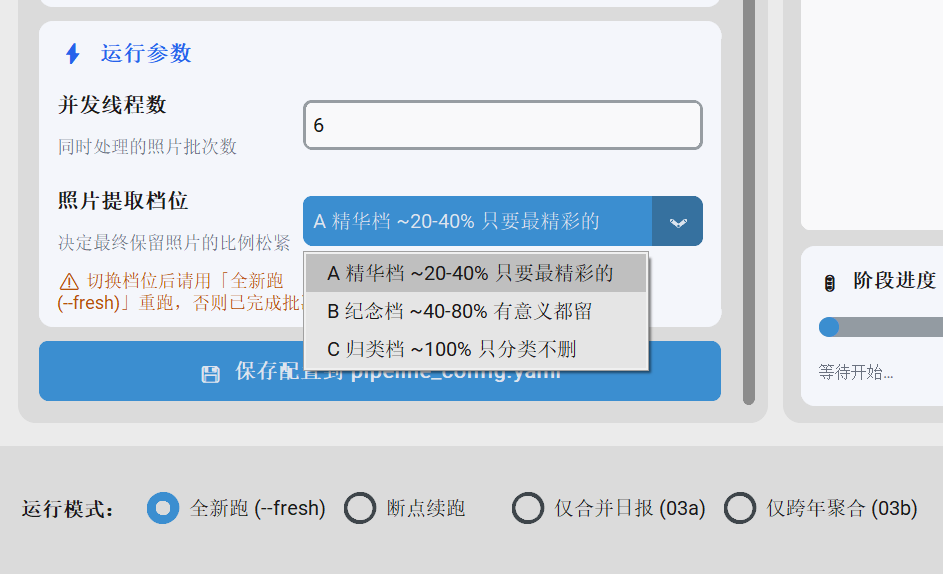
精华档 (~30%)、纪念档 (40-80%)、归类档 (100%),一个开关切换筛选力度。 Curated (~30%), Memories (40-80%), Classify-all (100%). One switch to change strictness.

电脑 + 家中服务 + 手机PC + home service + phone

电脑上的图形界面(GUI)一键跑全流程,家里的自用接口(API)让手机在户外远程分析,安卓 App 一键清理非精华。都是个人自用。 A desktop GUI (point-and-click, no commands) runs the full pipeline, a private home API lets the phone analyze on the go, and the app cleans your gallery — all for personal use.

断点续跑Resumable runs

十几万张的全量任务要跑一周左右,熔断/断电后自动从断点继续,零数据丢失。 A full run over 100k+ photos takes about a week; after a crash or power loss it resumes from checkpoint with zero data loss.

Work

项目组成What's inside

同一套归档大脑,在三种场景下自用。 One curation brain, three personal-use scenarios.

DESKTOP GUI

桌面归档工作台Desktop workbench

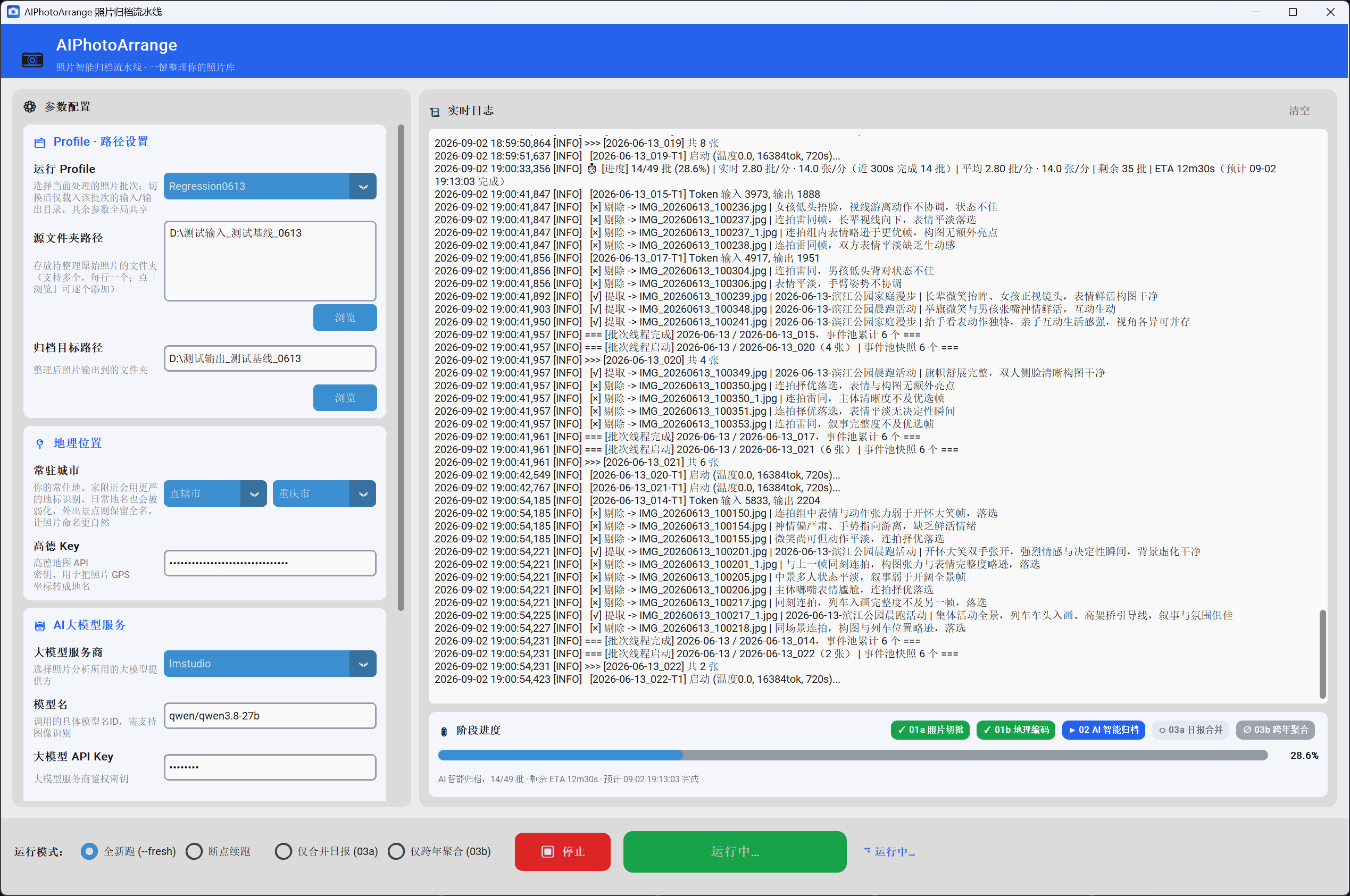
在电脑上运行的图形界面(GUI):选目录、选档位、点开始,实时看进度与 ETA(预计剩余时间)。全流程一键跑完。 A desktop graphical app (GUI): pick folders, pick a tier, hit start, and watch progress and ETA (estimated time left) in real time.
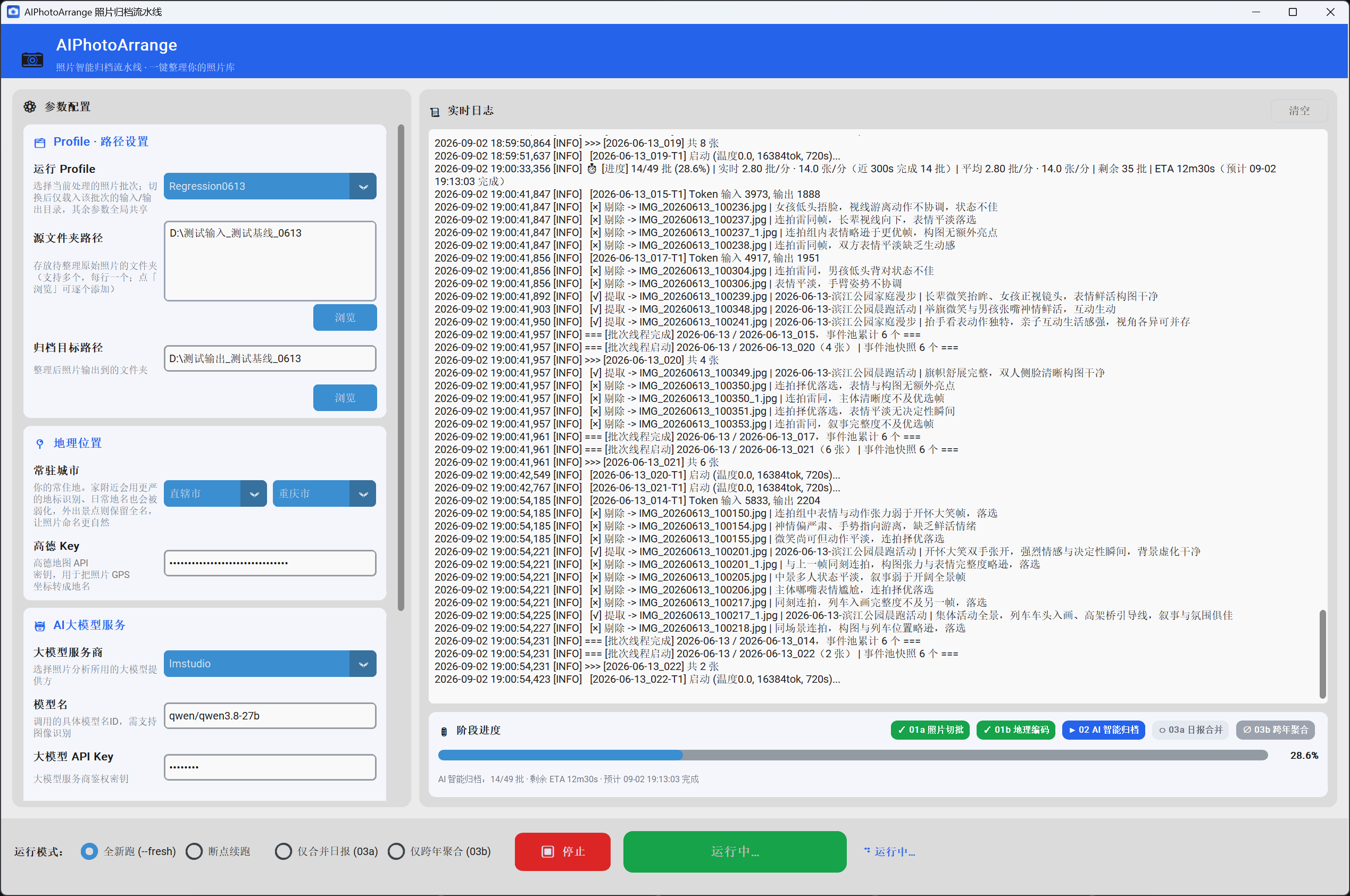
桌面归档工作台主界面截图
Pythoncustomtkinter Nuitka onefile实时 ETA
PRIVATE HOME API

自用远程分析接口Private remote analysis

在外拍完大量照片,不用带电脑、也不用把原图传回家:手机把压缩后的小图发给家里的电脑(自用接口 API),几分钟就拿到"该删哪些"的清单。仅本人设备通过 Token 鉴权访问,不面向公众开放、不接受任何第三方上传。 Out shooting? No laptop, no uploading originals home: the phone sends compressed thumbnails to your own PC's private API and gets a delete list back in minutes. Only the owner's devices access it via token auth — not public, no third-party uploads.

自用远程分析接口时序示意图
FastAPI分块上传 仅本人 Token 鉴权Caddy + HTTPS 加固自用接口fail2ban 防扫描
ANDROID APP

PhotoCleaner

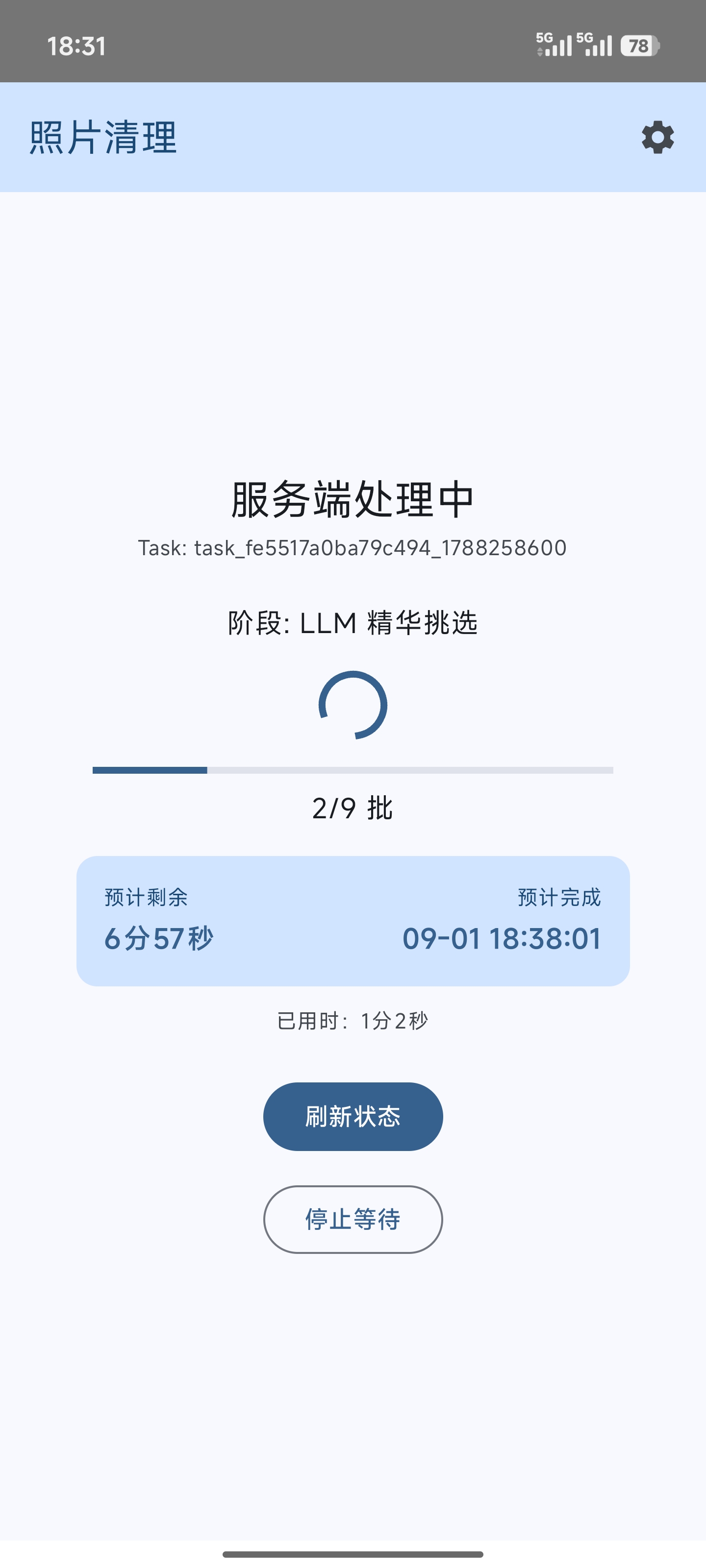
选择要整理的照片范围,上传到自己家里的接口远程分析,查看需要删除的照片,一键移入回收站。原图不出手机。 Pick a photo range, upload to your own home API for analysis, review the photos to delete, and trash them in one tap. Originals stay on device.
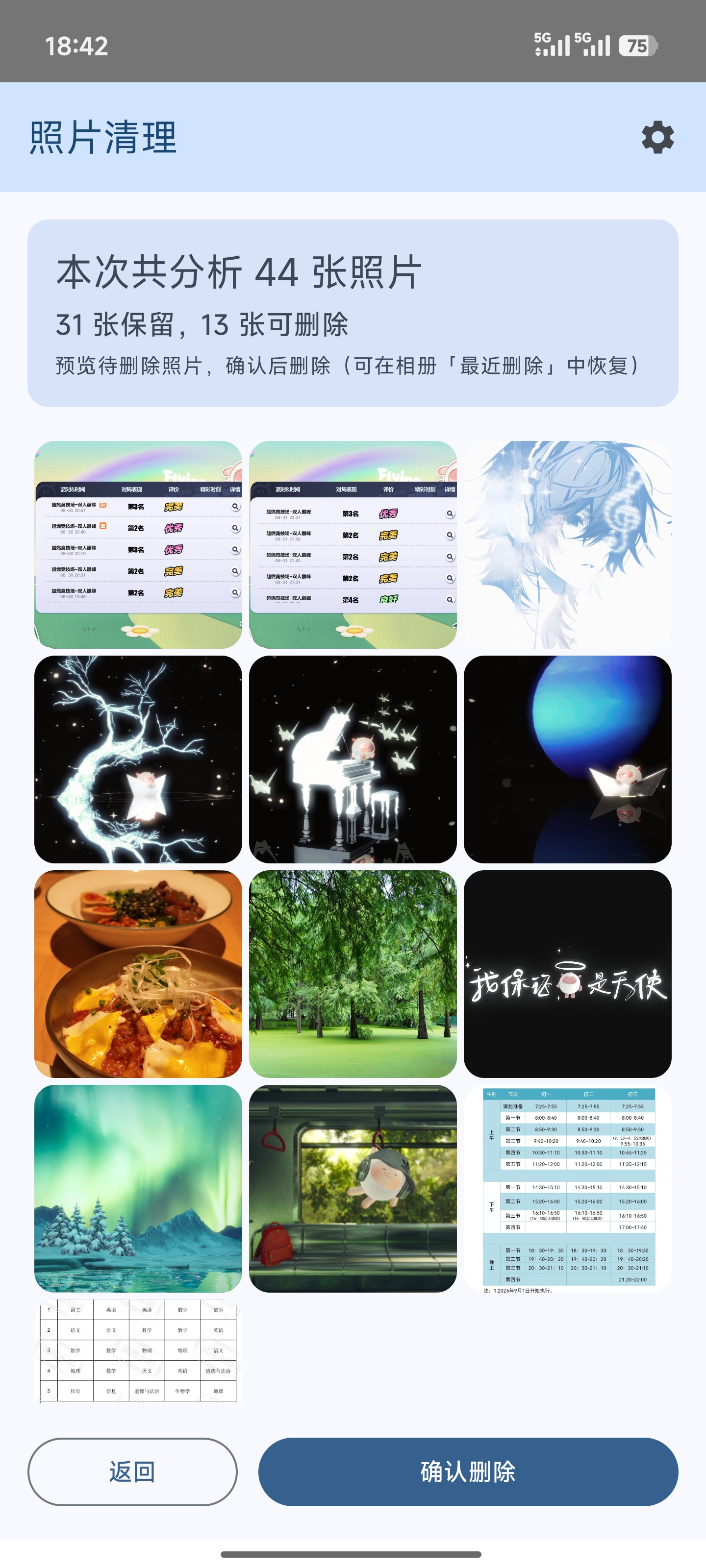
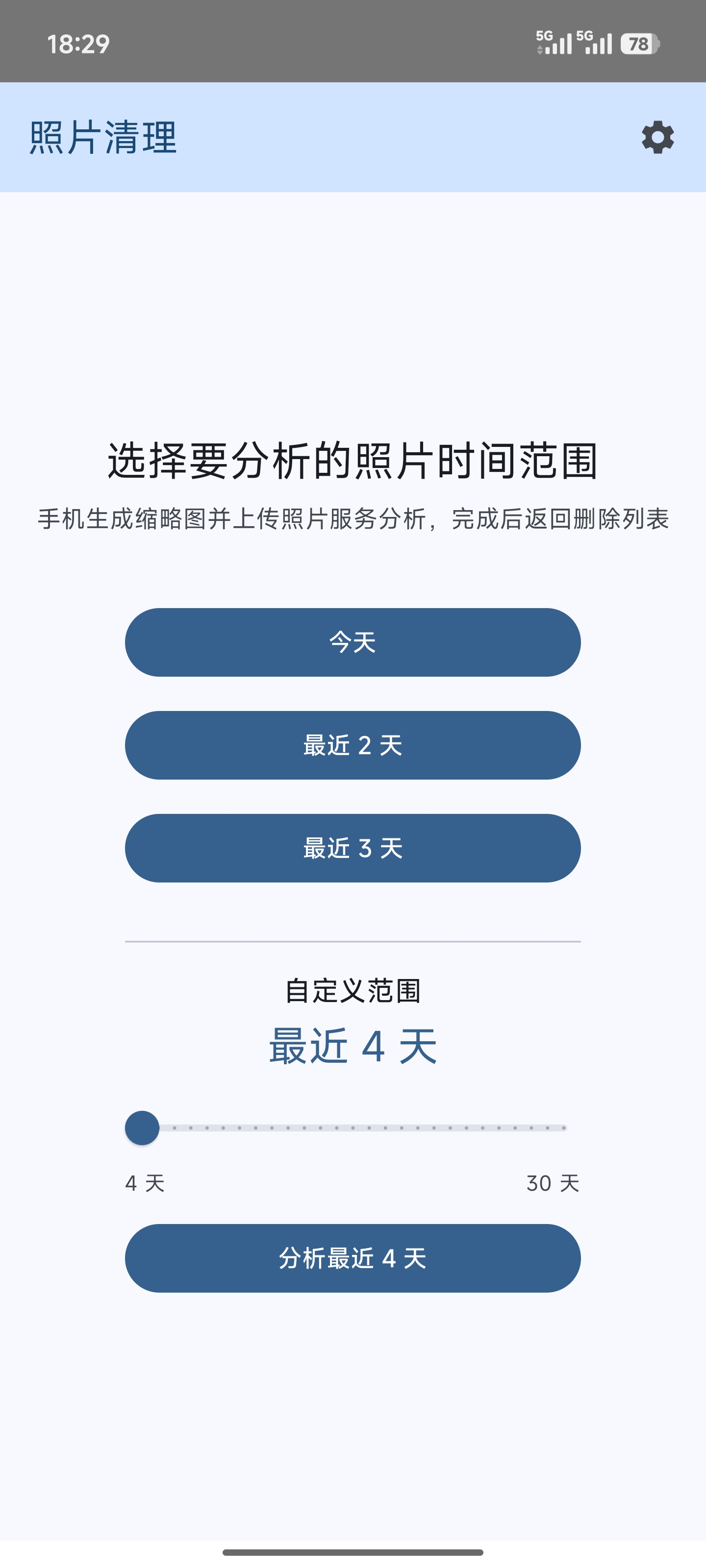
PhotoCleaner 结果页截图 PhotoCleaner APP 主界面截图
KotlinJetpack Compose Material YouMediaStore

桌面归档工作台使用四步Desktop workbench in 4 steps

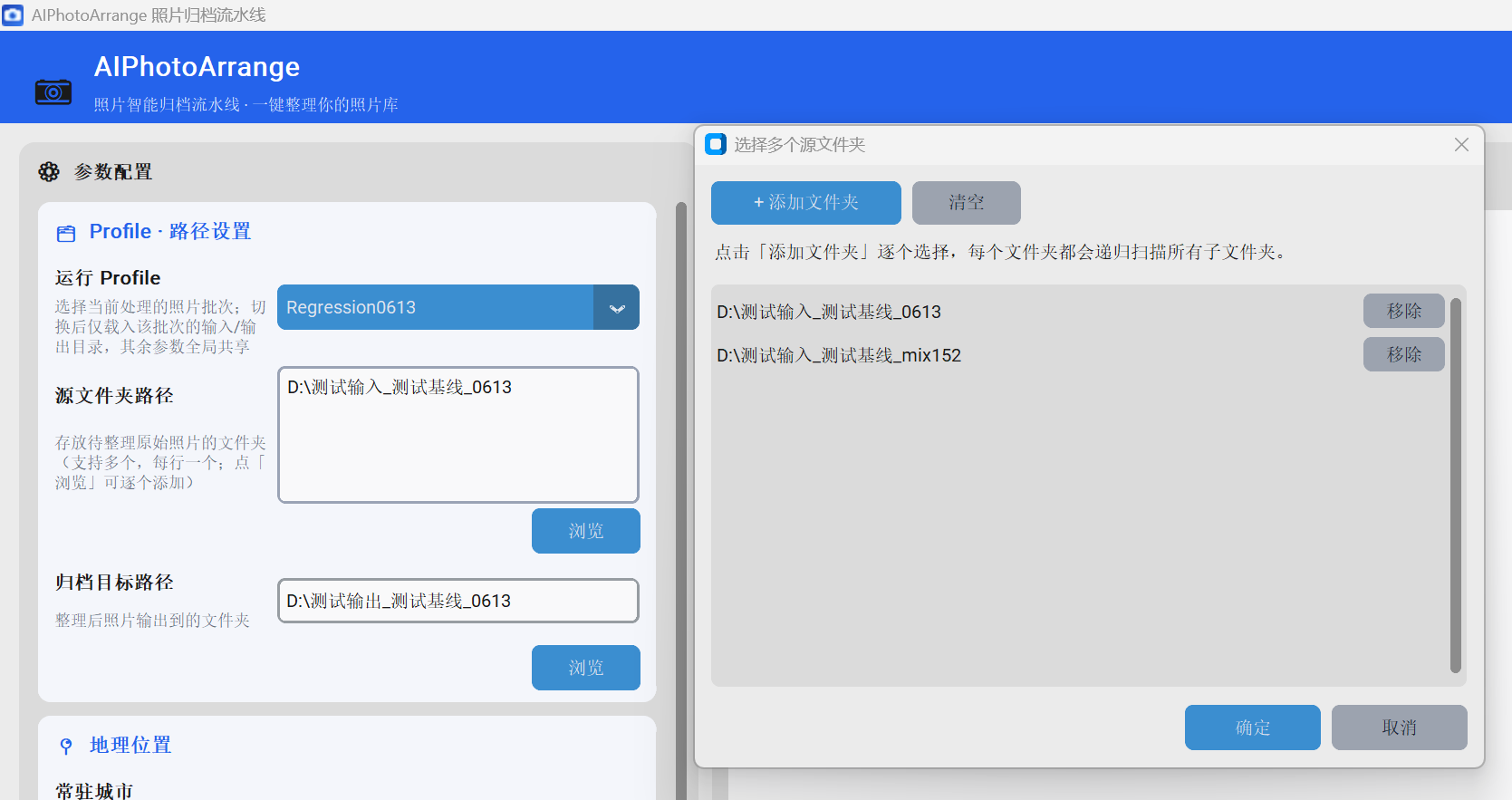
选目录、选档位、一键开始,跑完直接得到按「日期-事件」归好的库。 Pick folders, pick a tier, hit start — end up with a date-event archive.
1
桌面工作台 步骤1 选择目录[ 步骤1 截图
assets/gui-step1.png ]
[ Step 1
assets/gui-step1.png ]
选择照片源与归档目录Pick source & archive folders
2
桌面工作台 步骤2 选择档位[ 步骤2 截图
assets/gui-step2.png ]
[ Step 2
assets/gui-step2.png ]
选择 A/B/C 提取档位Choose an A/B/C tier
3
桌面工作台 步骤3 实时进度[ 步骤3 截图
assets/gui-step3.png ]
[ Step 3
assets/gui-step3.png ]
实时进度与 ETAReal-time progress & ETA
4
查看「日期-事件」归档结果Browse the date-event archive
特别适合谁Perfect for

硬盘里攒了十几年家庭照片的人 —— 手机导出、相机存储卡、微信保存的图混在几十个目录里,重复照片一堆,一直想整理却从来腾不出时间。挂上去让它自己跑,十几万张一周左右出结果,中途断了也能续跑,跑完得到一个按「日期-事件」归好的库;全程不删除任何原图,只是重新归置,不满意还可以换个档位重跑。 Anyone sitting on a decade-plus of family photos — phone exports, camera cards, saved chat images scattered across dozens of folders, full of duplicates, always meaning to sort it out and never finding the time. Just leave it running: 100k+ photos take about a week, it resumes if interrupted, and you end up with a clean date-event archive. It never deletes an original — it only re-places them, so you can always rerun at a different tier.

PhotoCleaner 使用四步PhotoCleaner in 4 steps

一分钟清理手机相册,只留下值得分享的精华。 Clean your gallery in under a minute, keep only what's worth sharing.
1
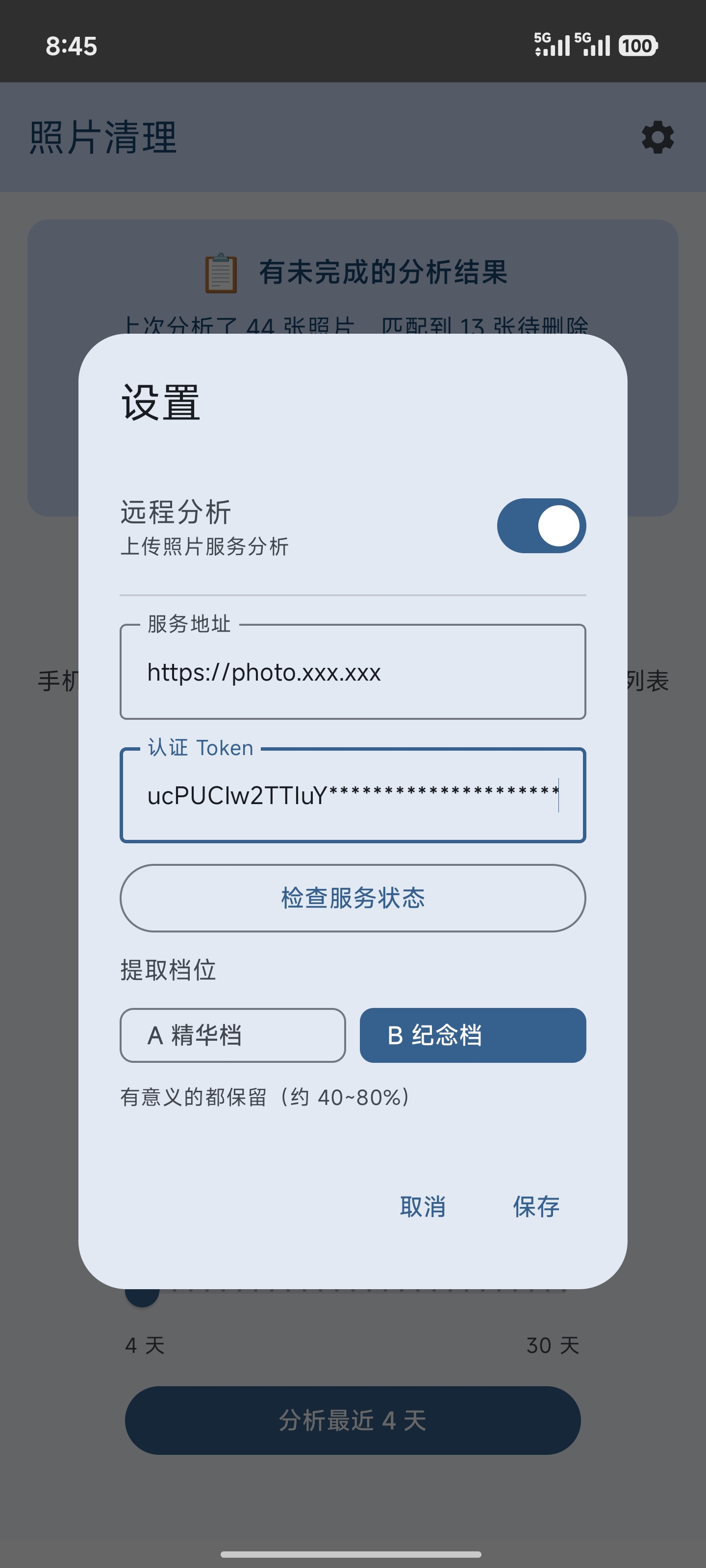
PhotoCleaner 配置界面
自用服务配置Configure
2
PhotoCleaner 主界面
选择相册照片Select gallery photos
3
PhotoCleaner 分析处理中
分析与匹配进行中Analyzing & matching
4
PhotoCleaner 完成预览
预览后一键删除Preview & delete
特别适合谁Perfect for

一次外出就拍下大量照片的摄影师、连拍党、旅游 / 街拍爱好者 —— 刚从一场活动、一趟旅行、一次街拍回来,相册里躺着几百上千张,需要快速筛出值得留的精华、批量清掉仓鼠囤积。用 PhotoCleaner,几分钟内完成「上传分析 → 预览 → 一键删除」,不用回电脑挨个翻。 Photographers who come home with hundreds of shots from a single outing — burst shooters, travelers, street photographers. You just got back from an event, a trip, or a walk with a few hundred to a thousand frames and need to quickly find the keepers and bulk-trim the hoard. With PhotoCleaner, "analyze → preview → one-tap delete" takes minutes — no need to flip through them back on your PC.

Architecture

架构设计Architecture

四段式流水线,各司其职。让模型做识别,让脚本做确定性的事。 A four-stage pipeline. The model recognizes; the scripts handle the deterministic parts.

AIPhotoArrange 归档流水线架构图

01a 感知哈希(phash)+ 时间双信号切批并自动去重  ·  01b 高德反向地理编码 + POI 评分,地点粒度策略下沉到脚本  ·  02 视觉大模型逐批挑精华、命名事件,带三档提取与断点续跑;默认调用本地模型(Ollama 的 gemma4:31b、LM Studio 的 qwen3.8:27b),照片不经过任何云端;没有显卡时也可改配置切到在线模型(如百炼 qwen3.7-plus)  ·  03a/03b 可选的日报合并与跨年同主题事件聚合。 01a chunks by perceptual hash (phash) + time and dedups  ·  01b Amap reverse geocoding + POI scoring, with locality granularity pushed into the script  ·  02 the vision model picks highlights and names events, with A/B/C tiers and resumable runs — on local models by default (gemma-4-31B via Ollama, qwen3.8:27b via LM Studio), so photos never touch the cloud; without a GPU you can switch to an online model (e.g. DashScope qwen3.7-plus) via config  ·  03a/03b optional daily merge and cross-year event clustering.

OUTPUT

桌面全库归档成果The full-library result

桌面归档全程不删除任何照片,只是把原图按「日期-事件」的新结构重新归置,原库与原图完好无损。 Desktop archiving never deletes anything — it just re-places your originals into a new date-event structure, leaving every original intact.

手机远程分析时序Remote analysis flow

手机传缩略图,家里的电脑(自用接口)跑管线,回传待删清单。原图不出手机。 Phone uploads thumbnails, your own home PC (private API) runs the pipeline, returns a delete list. Originals stay on device.

手机远程分析时序图

为什么快Why it's fast

300 张照片从「传原图约 30 分钟」压缩到「传缩略图约 2 分钟」,户外也能随手整理。分块上传 + SHA256 校验,支持断点续传。 300 photos drop from ~30 min (originals) to ~2 min (thumbnails), so you can curate anywhere. Chunked upload with SHA256 verification and resumable transfer.

原图不出手机断点续传SHA256 校验

上传不带 GPSNo GPS uploaded

缩略图剔除了 EXIF 位置标签,拍摄地点留在手机上。服务端无 GPS 时自动跳过 01b 地理编码,而精华挑选本就不依赖 GPS —— 保护隐私不影响分析效果。 Thumbnails ship without EXIF location tags, so where you shot stays on your phone. With no GPS the server just skips 01b geocoding, and curation never needed it — privacy costs nothing in quality.

不含 GPS自动跳过 01b效果不受影响
Journey

开发历程Development journey

95 次提交,从一条命令行脚本走到电脑 + 家中服务 + 手机的自用工具链。 95 commits, from a single CLI script to a personal PC + home-service + phone toolchain.

v1.0.0 · 2026-05

生产基线Production baseline

四段式流水线跑通,锁定 prompt v0.3.0 与 Ollama 版本,跑通全量归档。 The four-stage pipeline goes live, prompt v0.3.0 and the Ollama version locked in.

v2.0.0 · 2026-06

桌面 GUIDesktop GUI

customtkinter 图形界面,A/B/C 三档提取,实时进度与 ETA。 A customtkinter GUI with A/B/C tiers and real-time progress + ETA.

v2.1.0 · 2026-07

优化打包Packaging & speedups

Nuitka 编译单文件 exe;phash 并行把 5300 张从 18 分钟压到 7 分钟。 Nuitka single-file exe; parallel phash cuts 5,300 photos from 18 to 7 min.

v2.6~2.7 · 2026-08

事件聚合 + 手机删除清单Event clustering + delete list

03 拆分为 03a/03b,支持跨年同主题事件聚合;02 末尾生成手机端删除清单。 03 split into 03a/03b for cross-year event clustering; 02 emits a phone delete list.

v3.0.x · 2026-08

远程分析上线Remote analysis

FastAPI 服务 + PhotoCleaner 安卓 App,手机在外远程触发分析并真机验证。 FastAPI service + the PhotoCleaner Android app; remote analysis verified on real devices.

v3.1.x · 2026-08

个人自用接口的公网访问加固Hardening the private self-use API

为个人自用接口的公网访问加一层防护:双层 Caddy 反代 + Let's Encrypt + fail2ban + Token 鉴权,仅本人设备可用,部署后再做一轮安全审核修复。 Locking down the owner-only API's public access: two-layer Caddy + Let's Encrypt + fail2ban + token auth, plus a post-deploy security audit.

Lessons

踩坑实录Battle scars

真实项目里最贵的五课,比功能列表更能说明工程判断。 The five costliest lessons — they say more about engineering judgment than any feature list.

✍️ 提示词调优 · 三代演进PROMPT TUNING · THREE GENERATIONS

规则越加越多,命名却越来越平庸More rules, blander names

v0.1v0.1 首版能挑精华、能命名,但偶尔冒出错误的亲属称谓和「南方局旧址周末漫游」这类过窄命名。 The first version picked and named, but occasionally invented wrong kinship terms and over-narrow names.
v0.2 为压制这些问题,我往提示词里加了两条限制规则:「限定地点粒度」和「避免具体景点名」。副作用是灾难性的——所有命名向保守模板坍缩,「家庭聚会」「室内聚餐」「市区夜间漫游」高频复读,生动度全失。规则本想收敛错误,结果把好命名也一起压死了。 To suppress them I added two rules to the prompt: "constrain locality granularity" and "avoid specific landmark names". The side effect was disastrous — every name collapsed into conservative templates like "family gathering", "indoor meal", "night walk downtown", repeated endlessly.
v0.3 彻底换思路:命名规则只留一句话,主题靠 few-shot 示例传达——直接给一串好命名当范本,如「花鸟市场大采购 / 照母山公园秋日漫游 / 冬至包饺子聚会 / 黄山日出」;再把退化样本作为反例锚点钉住,明确禁止「家庭聚会 / 室内聚餐 / 市区夜间漫游」这类信息密度过低的命名。同时把「地点粒度」这种确定性逻辑下沉到 01b 脚本(用高德反向地理编码 + POI 评分决定用「XX 公园」还是「XX 市」),不再让模型背规则。 A rethink: keep one naming rule, convey the target style via few-shot examples — a list of good names like "flower-and-bird market haul / autumn walk in Zhaomu Hill Park / winter-solstice dumpling gathering / Huangshan sunrise" — and pin the regression with counter-examples that ban low-density names like "family gathering / indoor meal / night walk downtown". Then push the deterministic "locality granularity" logic down into the 01b script (Amap reverse geocoding + POI scoring decides "X Park" vs "X City") instead of the prompt.
沉淀:对 31B 规模的本地模型,少用规则文本、多用示例,few-shot 教学远胜规则解释——与其写「不要太笼统」,不如直接给几个好例子和几个坏例子。更进一步:让模型做它擅长的(看画面识别活动),让脚本做它擅长的(基于 GPS 定地点粒度)。 Takeaway: for a 31B local model, fewer rules and more examples — instead of writing "don't be too generic", just show a few good and bad examples. Further: let the model do what it's good at (reading the scene), let scripts do what they're good at (deciding locality from GPS).
🔴 图像损坏幻觉 BugCORRUPTION HALLUCINATION

模型坚称好照片「损坏、失真、有噪点」The model kept calling good photos "corrupted"

症状Symptom 某次升级后频繁以「图像损坏/严重失真/数字噪点」为由剔除照片,可照片实际完好。 After an upgrade, batches rejected fine photos citing "corruption / distortion / noise".
排查Debug 排除了批量大小、num_ctx、prompt、GPS 改动等假说后,切到云端 provider 跑同一批,5 分钟得到干净结果,锁定问题在本地推理栈。 After ruling out batch size, num_ctx, prompt and GPS, switching to a cloud provider ran clean in 5 minutes — isolating it to the local stack.
根因Root Ollama 0.30.9 引入的 context shift 在 16K 上下文 + 多图场景下破坏了 vision token 边界。锁定 v0.30.8 后消失。 Ollama 0.30.9's context shift broke vision-token boundaries at 16K ctx with multi-image prompts. Pinning v0.30.8 fixed it.
沉淀:怀疑模型行为异常时,第一动作是换 provider,而不是调 prompt。换 provider 是 5 分钟的实验,调 prompt 是几天的弯路。 Takeaway: when you suspect the model, switch provider first, don't tune the prompt. It's a 5-minute experiment vs. a multi-day detour.
🎲 量化引入的不可复现QUANTIZATION NON-REPRODUCIBILITY

一次「惊艳」的成绩差点骗了我One "amazing" score nearly fooled me

现象What 评估新模型时开 KV cache Q8,同 prompt / temp=0 两次跑出 21 vs 15 的命中率,让人误以为新模型质量暴涨 50%。 With KV cache Q8, identical temp=0 runs gave 21 vs 15 hits — looking like a +50% jump.
真相Truth 改 F16 KV cache 后,连跑收敛到 16-17。那次 21 是量化噪声制造的假信号,不可追。 With F16 KV cache, repeated runs converged to 16-17. The 21 was quantization noise — a false signal.
沉淀:任何单次测试都要重复 3 次看方差才能定基准。"run twice is a start, run thrice is a baseline." Takeaway: repeat any test 3× to trust the variance. "Run twice is a start, run thrice is a baseline."
⚡ 采样参数的隐形成本HIDDEN COST OF A SAMPLING KNOB

temp=0 下一个无用参数让速度慢了一倍A useless knob at temp=0 doubled the runtime

发现Finding 同样的解码配置,pmin 从 0.75 改 0,耗时从 1711s 降到 823s(省 52%),命中率几乎不变(差 0.3,误差范围内)。因为 temp=0 本就走贪心 argmax,pmin>0 只是白白触发候选集过滤计算。 Same decode config, pmin 0.75→0 cut time from 1711s to 823s (−52%) with no quality change. At temp=0 it's greedy argmax anyway; pmin>0 just wastes cycles filtering candidates.
沉淀:贪心解码下要逐个体检采样参数——很多在 temp=0 时毫无收益,却在默默吃掉一半吞吐。 Takeaway: audit every sampling knob under greedy decoding — many do nothing at temp=0 while silently eating half your throughput.
🧟 杀父不杀子 · 孤儿进程并发写ORPHANED CHILD PROCESSES

点了"停止",子进程却还在偷偷改文件Hit "stop", but children kept writing files

症状Symptom GUI/接口上点"停止"后,父进程退了,但它派生的各 stage 子进程变成孤儿继续跑,和续跑的新进程并发写同一批中间文件,偶发数据错乱。 After hitting stop, the parent exited but its stage child processes turned into orphans, kept running, and raced with the resumed run writing the same files.
根因Root Windows 下 terminate() 只杀父进程,不递归杀子进程树。流水线是"编排器派生多个 stage 子进程"的结构,杀父自然留下孤儿。 On Windows, terminate() kills only the parent, not the child tree. The orchestrator spawns per-stage children, so killing the parent leaves orphans.
修复Fix 用 Windows Job Object 把子进程树整棵绑进一个内核对象,停止时 TerminateJobObject 一刀切整树;再设 KILL_ON_JOB_CLOSE,即使程序崩溃/被强杀,操作系统也会连带回收整树。GUI 与自用接口共用同一套方案。 Bind the whole child tree into a Windows Job Object and kill it in one shot with TerminateJobObject; set KILL_ON_JOB_CLOSE so even a crash lets the OS reap the tree. Both the GUI and the self-use API share this.
沉淀:跨平台"停止后台任务"别只调 terminate()。Windows 上要按进程树管理生命周期,Job Object 是最干净的一刀切;能续跑的任务,杀干净比杀一半更安全。 Takeaway: don't rely on terminate() to stop background work. On Windows, manage lifecycle by process tree — a Job Object is the cleanest kill. For resumable jobs, a clean kill beats a half kill.
Quick start

快速上手Quick start

桌面整理全库,手机随手清理,各三步即可。 Curate your library on desktop, tidy your phone on the go — three steps each.

DESKTOP GUI

桌面端操作On desktop

  1. 在 GUI 里选择照片源目录与归档输出目录。 Pick your source folder and archive output folder in the GUI.
  2. 选择提取档位(A 精华 / B 纪念 / C 归类),点开始。 Choose an extraction tier (A / B / C) and hit Start.
  3. 实时看进度与 ETA,跑完在归档目录查看按「日期-事件」整理好的结果。 Watch progress and ETA; when done, browse the date-event folders in your archive.
PHONE · PHOTOCLEANER

手机端操作On phone

  1. 在 PhotoCleaner 里选择要整理的照片范围。 In PhotoCleaner, select the range of photos to tidy.
  2. 上传到自己家里的接口远程分析处理(仅传缩略图,原图不出手机;仅本人 Token 鉴权访问)。 Upload to your own home API for analysis (thumbnails only, originals stay on device; owner-only token auth).
  3. 查看需要删除的照片,预览后一键移入回收站。 Review the photos to delete, then trash them in one tap after preview.